The interface is in English. Why does “today” still follow Japan time?
- The problem
- An overseas team changes the interface language but still has to reinterpret dates because the company time zone is wrong for its operating setup
- Revenue CRM feature
- Country, tax & time zone: company date settings separate from the interface language
- Where
- Settings → Country, tax & time zone / Time zone / Save
Your overseas team switches the interface to English. Someone still asks whether a date means today locally or today in Japan. Making the words readable has not necessarily aligned the business calendar.
Revenue CRM’s B2B edition separates the display language from the company’s country and time zone. Check both before assuming that an English screen uses your office’s date boundary.
Agree on the business date before changing settings
Language determines how people read the interface. The company time zone supplies the reference for dates and for boundaries such as “today.” They solve different problems.
Repeated conversions make even a simple request harder: “Please check today’s records” needs an explanation of whose today you mean. If a team spends two minutes on that clarification five times a week, it adds up to forty minutes over four weeks. This is an illustrative assumption, not a measured saving.
Choose a common business reference. Do not have employees in different locations keep changing the company setting to match wherever they happen to be working.
Check Country, tax & time zone under Settings
Owners and admins can change the company country and time zone. These controls are separate from the language buttons at the top of the interface.
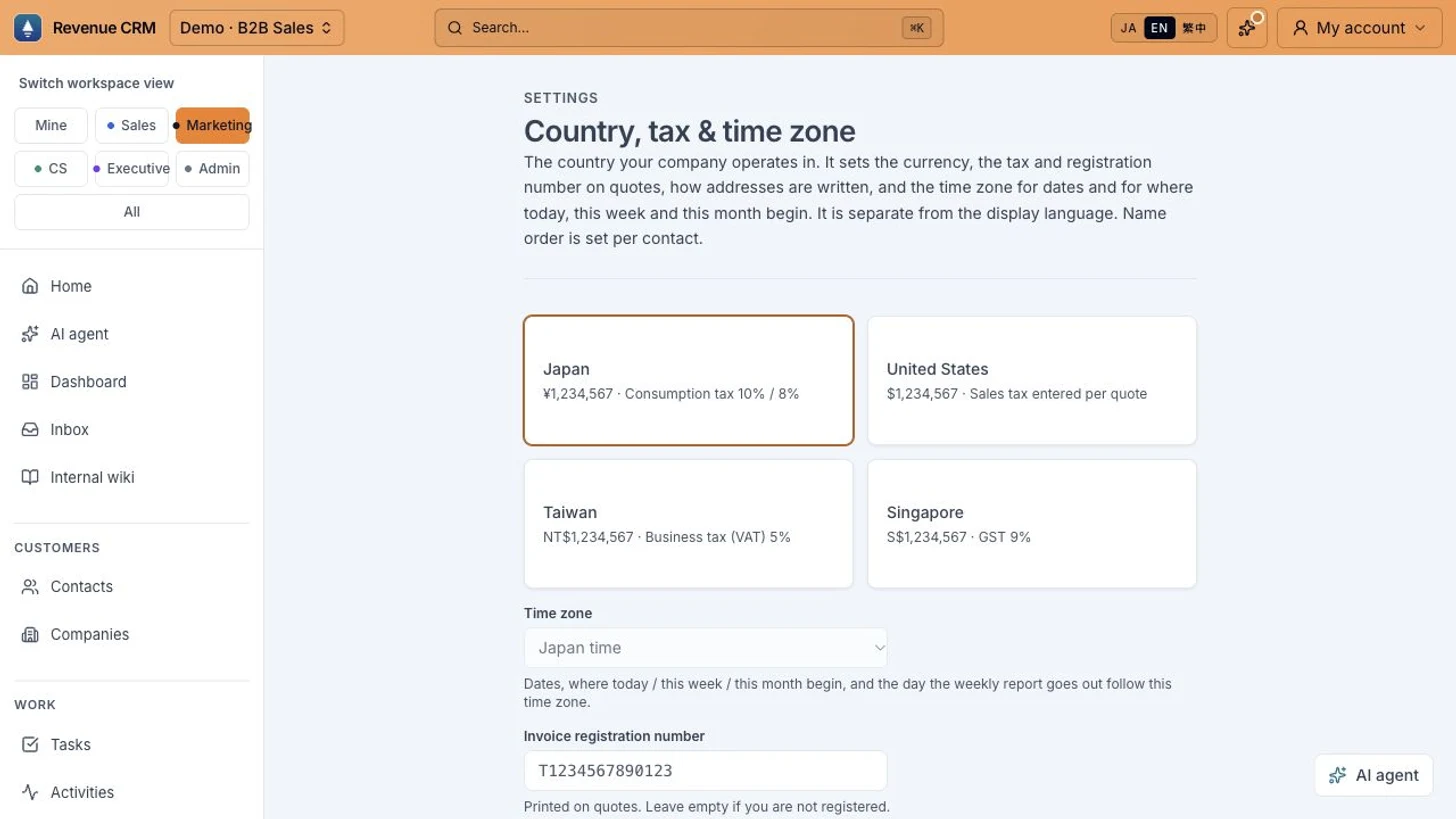 The English interface still shows Japan as the selected country. No country or time-zone setting was changed for this screenshot.
- Open Settings → Country, tax & time zone.
- Check the company country and the Time zone field beneath it.
- If a change is needed, an owner or admin reviews the values, selects Save, and checks the Saved message.
The available countries are Japan, the United States, Taiwan and Singapore. Japan, Taiwan and Singapore each have one time-zone option, so that field cannot be switched. A disabled field does not necessarily mean you lack permission.
For the United States, options include Eastern, Central, Mountain, Pacific, Alaska and Hawaii. Phoenix has its own no-daylight-saving option. Choose the reference that matches the company’s location and operating setup.
Country is more than a date preference
Do not switch country just to make the clock look right. The same setting affects currency, quote tax and registration-number fields, and address formatting.
Existing quotes retain their currency and tax rate when the country changes. New quotes use the selected country’s settings. The time-zone choices are also limited to that country; a company set to Japan cannot select New York in this field.
A Japanese company using English and a company operating with US settings are different cases. The interface language alone is not a reason to change country.
Begin by checking the current reference with an administrator
This week, review the current country and time zone before changing either. Take one record that a colleague has been mentally converting and compare which date each person expected to see.
That tells you whether the problem is the language or the business-date reference, and which setting deserves attention.
Choose the B2B edition in the Revenue CRM demo, then open Settings → Country, tax & time zone to see the controls separately from the interface language.
The demo opens with just an email address.
Read next
 The work of setting up The detail you need before a sales call is buried in a wall of notes The same sales detail is buried in free-form notes and must be found again at every handoff. Define a contact custom field and fill it from an existing contact’s edit form
 The work of setting up Every inquiry arrives as free text. Someone has to classify it again. The request type is buried in a message, so staff classify every inquiry after it arrives. Dropdown and radio choices on forms