Revenue CRM
From what goes wrong in running a school to the screen that fixes it
One real problem from running a school or studio at a time (inquiries buried in chat, trials that never convert, make-up lessons and billing piling up at month end) and the exact Revenue CRM screen that removes it.
The work of entering data
Chat inquiries, trial-lesson notes, what happened in class. Student records that get kept without the teacher typing them in.
 The work of entering data The new student roster is ready. Why enter every student again? A school has its new enrollment list in a spreadsheet but still retypes each student into the app Bulk student CSV import: add new student records from a fixed seven-column roster
 The work of entering data Students who quit stay on the morning to-do list and keep getting fee reminders A parent says on LINE that their child is leaving, or taking a break, but the roster still shows them as active. The next morning there's a task to nudge them to book, before the next due date the fee flips back to unpaid, and teachers learn to scroll past it Student status (on the student profile, ⚙ Change status → Paused, Graduated or Withdrawn takes the student out of automatic tasks, LINE homework reminders, the monthly fee reset and overdue monthly-fee reminders from the next night; Withdrawn also records the date and reason)
 The work of entering data Every lesson gets booked through a back-and-forth on LINE Teachers and the front desk settle "which evening next week?" one student at a time, late at night, then copy the agreed slot into a calendar by hand, so slots get mistyped and double-booked LINE self-booking (a student taps 予約する (Book) in the rich menu and books in three taps: lesson type, teacher, slot. Slots come from the teacher's booking hours minus existing bookings, the teacher's calendar events and school breaks)
 The work of entering data What happened in each lesson is never handed over, so a new teacher starts from zero Lesson content lives in each teacher's notebook and memory, so every time a student changes teachers the new one begins by asking the student where they left off Lesson log (recorded from the student's record and kept in the history on that same record)
 The work of entering data What you learn in the trial lesson stays in the teacher's head Why the student wants to learn and where they are today is never written down, so the next teacher asks the same questions again The 初回ヒアリング (first interview) section of the student record: filled from the trial form, at registration, or from pasted notes
The work of setting up
Courses, fees, closed days, teachers. Put the shape of your school in as it is and use it from day one.
 The work of setting up A new homework activity is missing from LINE's submission choices Students submit a new homework activity under an unrelated category because its name is missing from LINE Custom lesson types with homework enabled
 The work of setting up A different Zoom display name keeps lesson records off the student profile A learner joins under a nickname, leaving imported Zoom records disconnected from their student profile. Link an imported Zoom participant display name to an existing student
 The work of setting up Teachers only notice new homework after opening the system Teachers repeatedly open the system to find out whether their students have submitted homework. Link a teacher’s LINE account to receive alerts for relevant homework submissions
 The work of setting up The LINE account is hooked up, but no homework and no new followers are reaching the school The school entered its LINE Official Account credentials and assumed it was done, but a setting on the LINE side was still off. Not one homework submission or new follower made it in, and nobody noticed for days LINE connection check (open More > Integrations and the system asks LINE directly, showing 受信中 (receiving), Webhook OFF, URLが違う (wrong URL), 未連携 (not connected) or 状態不明 (unknown), plus the LINE friend count and the number imported into the CRM. The status is shown to the Manager and Office roles)
 The work of setting up Your best teacher can't read the admin screens, so someone else types up every lesson Teachers who don't read the language of the admin screens hand over lesson notes on paper or in chat, and someone in the office retypes them. Records arrive late and thin, and the teacher can't open their own students' profiles The JA / EN switch at the top right of the screen (it changes the menus, buttons and profile labels in that person's browser only)
 The work of setting up The student profile asks about English level, but you run a piano school A piano school or a cram school opens the intake section of a student profile and finds "English level" and "Trial conversation: strengths". Teachers either leave the fields blank or squeeze piano experience into "English level", so what was learned in the trial lesson ends up in different places for each teacher Profile field names (More → 📝 Profile field names, or Profile field names in the desktop sidebar. Renames the six intake fields on the student profile. The new names are used on the profile, the new-student form, AI auto-fill, the trial booking form and the CSV export)
 The work of setting up Teachers keep asking the owner which lessons are theirs Teachers can't see their own lessons, so they ask the owner every time. The owner retypes bookings into each teacher's calendar, and lessons collide with personal appointments Per-teacher Google Calendar connection (a teacher connects their own Google account and the lessons assigned to them land in their calendar automatically. Busy times in their personal calendar are left out of the LINE booking slots)
 The work of setting up The week the school was closed still shows up as missed lessons During the summer or New Year break the system keeps flagging missing lesson logs, LINE self-booking offers slots on closed days, and the teacher's first morning back is spent clearing false alarms Breaks & holidays (register a period with no lessons by name, start date and end date; those weeks drop out of the unlogged-lesson check, closed days disappear from LINE booking slots, and no homework tasks are created while the break is on)
 The work of setting up Nobody has decided which teacher looks after which student No student has a named teacher responsible for them, so checking homework and reaching out to students who are drifting is left to whoever notices, and for some students nobody does Per-student assignment (assign teachers by role under 🎓 担当LEADERS on the student record, and that student's tasks and incoming homework appear on the assigned teachers' screens)
 The work of setting up Every new teacher gets the owner's login New teachers are handed the owner's email and password and everyone works under one login, so nobody can tell who wrote a record and every fee amount is visible to the whole staff User management (invite each person by email and role; they choose their own name and password; while an invite is pending you can issue a new URL, resend it or cancel it)
 The work of setting up You want teachers to see student records, but not what each family pays The roster and the fees live in one sheet, so sharing it shows every amount to every teacher, and not sharing it leaves teachers unaware of who has not paid while the owner answers every question alone Permissions (billing view closed per role; create and edit for students, lessons and tasks split by role)
 The work of setting up The trial sign-up form and the student roster are not connected Trial lesson requests land in a form notification email and never reach the roster, so retyping waits for whenever the teacher has a spare moment Trial booking form (an application goes straight into the student list)
The work of running it
Make-up lessons, absences, unpaid fees, students about to leave. Keeping it running without an office manager.
 The work of running it The next teacher has to hunt through Zoom for the phrases you taught A lesson summary names the topic but omits the exact phrases, leaving the next instructor to find the original chat. Read imported Zoom messages in Lesson chats
 The work of running it Homework disappeared from the inbox before anyone checked it A submission was accidentally marked reviewed and disappeared from the queue before its content was checked. Undo the reviewed state from the student record
 The work of running it The homework was submitted. Why did the student get a missing-work reminder? A homework file arrived through LINE without a lesson type, so the submission and missing-work check disagree. Assigning a lesson type to an unclassified homework submission
 The work of running it A student is now paused. Who handled the change? A changed student status sends the school owner asking every staff member who handled it Audit log: review the date, action, target, actor and details for the latest 40 entries
 The work of running it Teachers need a procedure. The owner has to find the manual again. Every question about a procedure sends the school owner back to the same documents Knowledge: open a synced teacher manual and read its contents
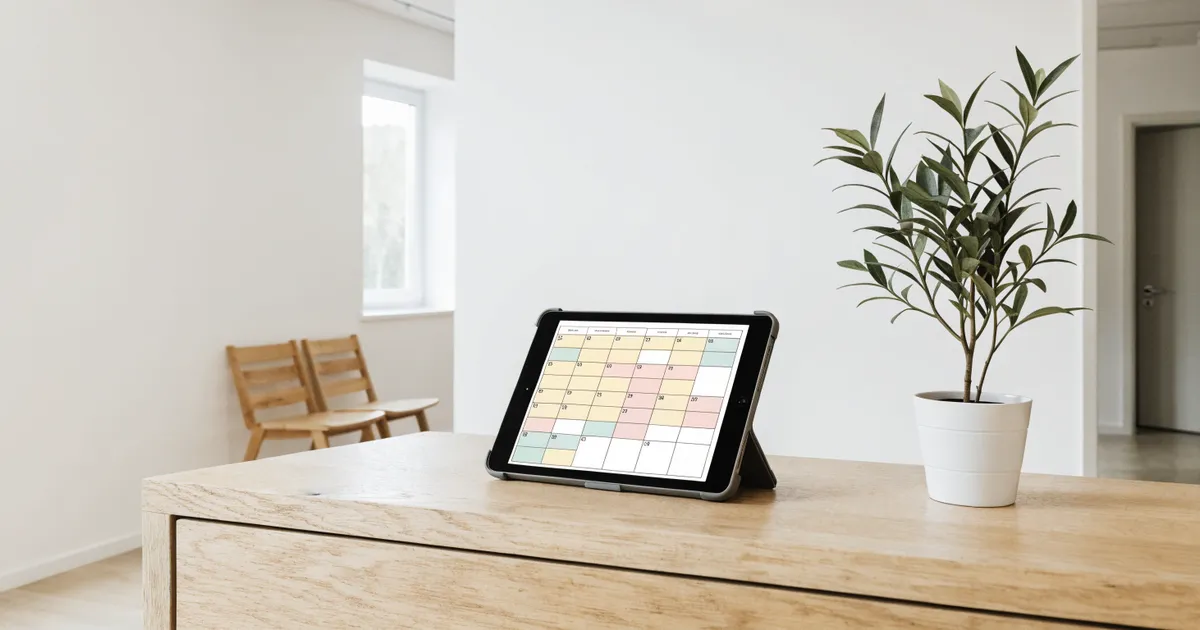 The work of running it To know how full next month is, the owner has to ask every teacher A trial inquiry asks which evenings are free next week. The bookings live in each teacher's planner and chat, so the owner has to check with every teacher before answering. Nobody can see which teacher is overloaded or which days sit empty until the month is over Calendar (More → 📅 Calendar, or Calendar in the desktop sidebar. Every booking made from a student profile or through the LINE booking button appears on a month grid, color-coded by teacher. Chips at the top narrow it to one teacher, and tapping a booking opens that student's profile)
 The work of running it The student who left without booking the next lesson, and never came back A student leaves without booking the next lesson. The teacher assumes the office will follow up, the office assumes the teacher did, nobody gets in touch, and the student quietly stops coming No next booking task (when an active student has no booking from today on, the morning automation puts "● No next booking" under "🚨 Act now" on Home. You can send the "📅 Nudge booking" template with "💬 Send on LINE", but sending doesn't clear it. It clears once a lesson is booked with "📅 Book next lesson" on the student record or by the student through LINE)
 The work of running it The owner has to ask each teacher, one by one, how far behind they are Each teacher's home screen shows only their own students, so the owner cannot see who is sitting on how many open items, or which work belongs to no one, without asking every teacher in turn Dashboard (More → 📊 Dashboard. Who's handling what lists, for each teacher, the open items on that teacher's home screen by type. Items with no teacher of that type appear under ⚠️ 誰のホームにも出ていないもの, and tapping one opens the student's profile)
 The work of running it Teachers write each student's monthly report from scratch, late at night At the end of each month, teachers scroll back through every student's lesson notes and write progress reports from scratch at night. The busier the month, the thinner the reports, and things that were in the notes never make it in Progress Reports (AI) (from a student's profile, drafts a report under five headings from the last 30 days of lesson notes; the teacher rereads it, edits it in the profile's LINE message box and sends it)
 The work of running it You can't switch tools because your school's data feels locked inside the app Each month's tuition status for the accountant, and the year-end roster, get retyped into Excel from screenshots of the management app. Because the data can't come out, the school can't move to a better tool either Export data (students, lesson logs, homework submissions and billing as four CSV files that open in Excel as they are; every export is written to the audit log)
 The work of running it Homework arrives by chat, and nobody knows which teacher looked at it Students submit homework over LINE and the message shows as read, but nothing records which teacher actually opened it, so everyone assumes someone else did and some submissions never get a reply Homework inbox (submissions that arrive over LINE sit in an unchecked list until someone marks them checked; who did it is kept in the audit log)
 The work of running it Teachers are typing homework reminders one student at a time, at night Teachers chase missing homework by memory, one LINE message at a time, so busy weeks get skipped and students who already submitted get nagged Automatic homework reminders (one LINE message per homework type once a student has gone three business days without submitting; you choose who gets them, student by student)
 The work of running it You notice the warning signs after the student has already quit The signs that a student is drifting away, homework that stops and messages that go unanswered, sit with the individual teacher, and the owner learns about them the day the cancellation arrives The 🚨 今すぐ対応 list on Home (students three business days without homework), 📩 課題の提出 on the student record, and the 課題が滞り filter on the student list
 The work of running it You find out about unpaid fees at the end of the month Fees collected by bank transfer or cash have not come in, you only notice while reconciling the bank statement against the roster at month end, and the reminder goes out a month late Billing screen (registering a monthly fee, unpaid rows sorted to the top, confirming a payment, alerts once the due date passes)
For the structural "why" behind these problems, see media.consilegy.com