You already have the contact open. Why find the same person again to start a deal?

- The problem
- A qualified inquiry becomes a deal, but the user has to find the same contact and company again.
- Revenue CRM feature
- Start a new deal from a contact and carry over the contact and primary company
- Where
- Contacts → New deal → Related records → Contact (primary) / Filter by name or email / Save
The conversation has moved from an inquiry to a concrete proposal. You already have the person’s contact record open. Starting a deal should not require going back to a separate list and finding that person all over again.
In Revenue CRM, New deal on the contact record opens a deal form with the person and their primary company carried over. Check the relationship first, then describe the opportunity.
Repeated selection creates another chance to pick the wrong record
Similar names, similarly named companies, and people with several affiliations make a simple selection less simple. Each fresh lookup asks the user to confirm information they already had in front of them.
A correct deal name and amount do not fix an incorrect related contact. A colleague taking over later may look in the wrong place for the opportunity.
Starting with the person keeps that relationship explicit while you enter the details of the new deal.
Start from the contact’s New deal button
Open the contact you are speaking with and choose New deal at the top. This opens an entry form; it does not create or save a deal yet.
Under Related records, Contact (primary) contains that person. If they have a primary company, Companies is populated too. Check that both are right for this particular opportunity.
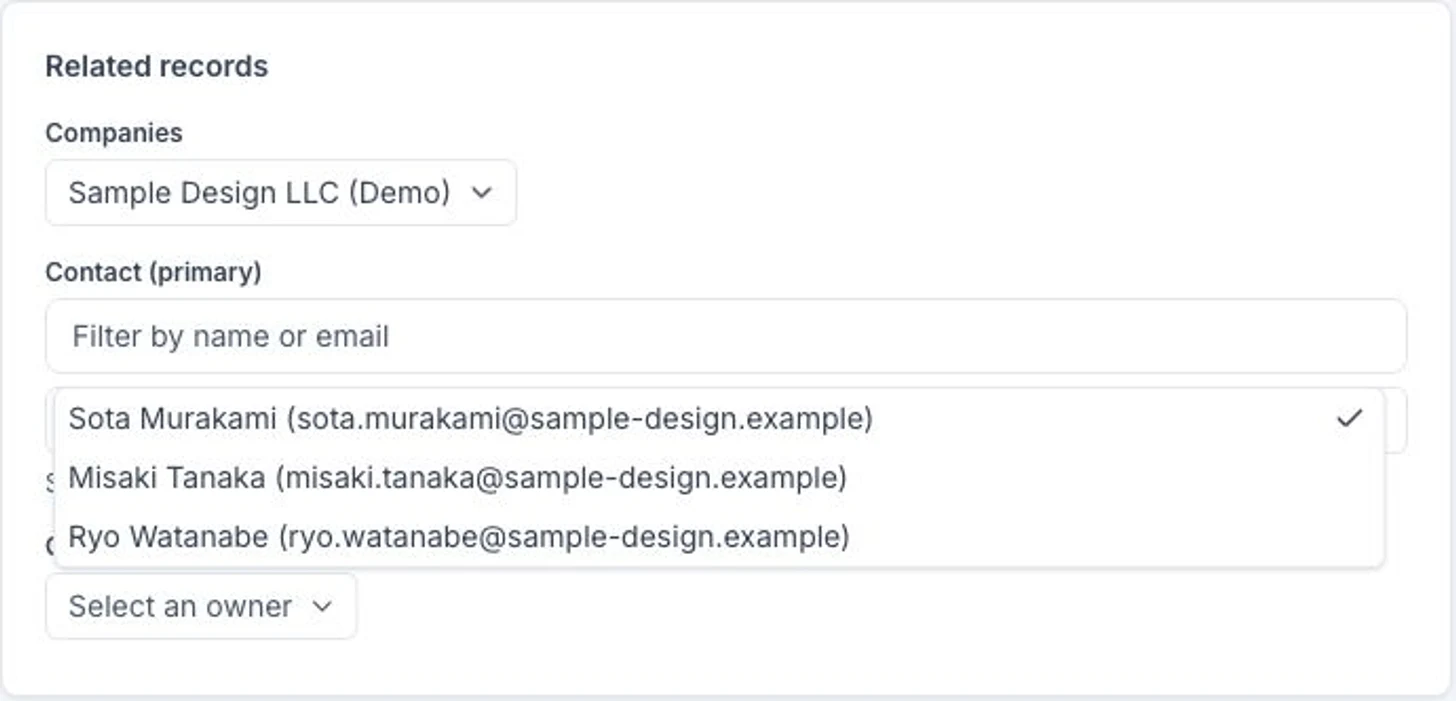 Names, companies and email addresses are demo samples. The form was opened without saving a deal.
Contact (primary) is the customer-side person. Your colleague responsible for the opportunity is selected separately under Owner (internal). Carrying over a contact does not assign the internal owner for you.
Enter the deal name, amount, expected close date, pipeline, stage and other information needed for the opportunity. Check the related records and internal owner, then select Save. A prefilled relationship is still only part of an unsaved form.
A company can also narrow the contact choices
When you select a company in the deal form, contacts linked to that company become the candidates. This includes both primary affiliations and additional company affiliations. Use Filter by name or email to narrow a longer list.
If no contacts are linked to the company, everyone is offered instead. Read the explanatory message; an available name does not by itself prove that the person belongs to the selected company.
Changing the company clears the selected contact when the new company has candidates and that person does not belong to it. Check the contact again after changing the company. The company-based choices also apply when editing a deal.
For a person with several affiliations, the contact shortcut carries over their primary company. If the opportunity concerns another affiliated business, change the company and verify it. This entry point also does not prevent duplicate deals: check existing opportunities before saving another one.
Use the shortcut on the next qualified inquiry
When the next inquiry becomes a proposal, stay on the contact record and choose New deal. Confirm the customer-side person and company, then the internal owner, before entering the opportunity details.
Try the Revenue CRM demo, choose B2B sales, and follow the contact-to-deal flow without saving a new record.
The demo opens with just an email address.
Read next
 The work of entering data You switched CRMs, and years of calls and meetings stayed behind in the old one Companies, contacts and open deals made it into the new CRM, but years of call, meeting and visit history stayed in the old system or in a spreadsheet export. When a new owner opens a contact, the history starts on the day you switched Activity history CSV import (Import CSV on the Activities page. Reads date, type, subject, body, outcome, contact email, company, deal name and owner, and places each activity on the contact, company and deal Activity tabs at its original date)
 The work of entering data Proposals and contracts live on each rep's laptop, and nobody can find them at handover Proposal, quote and contract PDFs exist only on the desktop of the rep who made them and in their sent mail. When that rep is out or leaves, nobody can answer "which quote did we send last?" Attachments (the Files tab on company, contact and deal pages. Upload puts a file on that record, listed with its name, size and who uploaded it. Text inside PDFs and images is read so the AI agent can search it)