The next teacher has to hunt through Zoom for the phrases you taught

- The problem
- A lesson summary names the topic but omits the exact phrases, leaving the next instructor to find the original chat.
- Revenue CRM feature
- Read imported Zoom messages in Lesson chats
- Where
- More → Lesson chats / Records / message-count button / student profile → Zoom records → Chat during the lesson
A covering teacher wants to reuse the phrase taught in the previous online lesson. The handover note says “practised polite requests,” but it does not include the wording. Someone has to find the original Zoom session or ask the previous instructor.
A summary of the lesson and a record of the words typed during it do different jobs. In Revenue CRM’s school edition, Lesson chats lets teachers read messages already imported from Zoom, so the next lesson can build on the same wording.
Return to the original wording when a summary is too broad
An imported chat shows the sender’s display name, the elapsed time from the recording’s start, and the message itself. It can preserve the example sentence a teacher used as an informal whiteboard.
Without that source, the covering instructor may wait for a colleague’s reply or ask the learner to reconstruct the previous lesson. That uses preparation time, or time that should have gone to practice. Reading the actual phrase gives the teacher something concrete to prepare around.
The screen does not rewrite the messages. A translation is available when someone typed it into the chat; the system does not add a translation that was never there.
Open More → Lesson chats, then the message count
Find the session by date and the displayed student name, then click its message-count button. The saved messages open underneath that row.
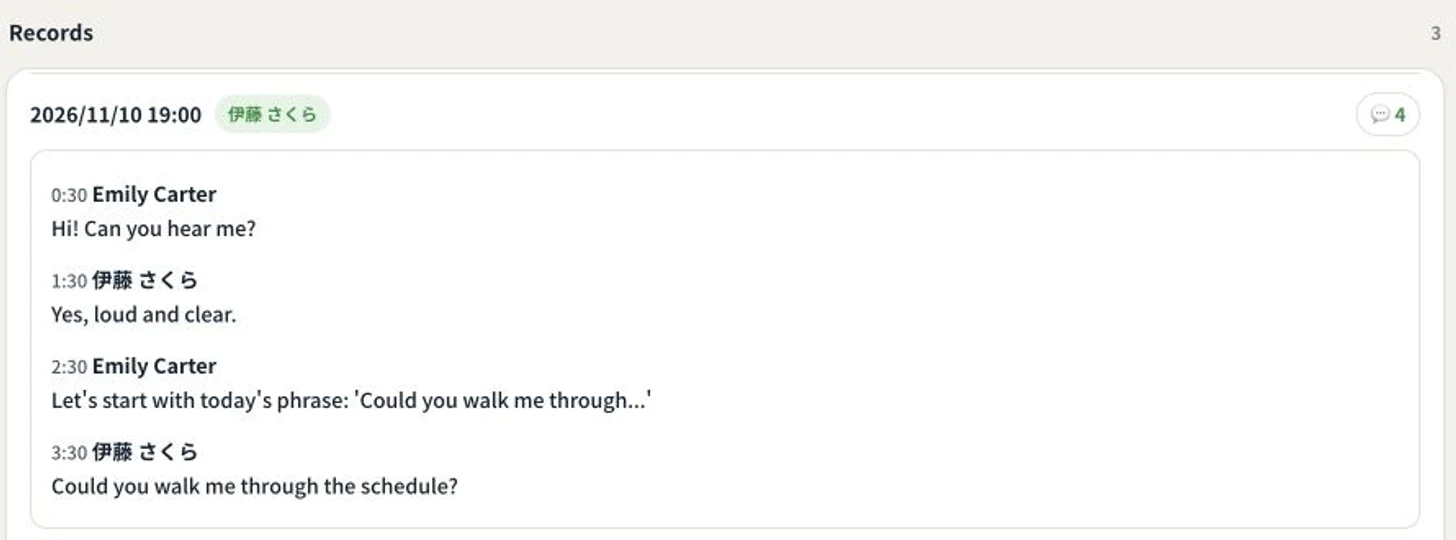 This is fictional student and teacher data in the demo. Only the saved chat was opened; no messages were posted, no sync was run, and no student links were changed.
Scroll inside the expanded panel to read a longer conversation. Click the same count again to collapse it. A label such as 2:30 is elapsed recording time, not the time of day.
For sessions already linked to a student, the student’s profile also offers Chat during the lesson under Zoom records. A session marked “not linked” in the separate list has not yet been associated with a student. Reading that session is separate from changing its association.
This is a view of imported messages
The school needs Zoom connected and the chat saved with a cloud recording and imported. Holding an online lesson alone does not guarantee that its contents appear here.
The screen is not a transcript of everything spoken, nor a copy of a teacher’s separate notebook. Direct messages are not included in this import. Reading the message body requires permission to view lessons.
The list fetches up to 120 recent entries with a chat-count value and displays those with messages. A session’s body is limited to its first 2,000 messages. There is no search across every session and every message. If a session is missing, ask the person managing the integration whether it has been imported rather than assuming it must be under another date.
Start with one handover
Choose one student whose next lesson will be taught by someone else. Open one imported session and let the covering teacher check the phrase they want to use again.
Keep lesson notes for what happened and what comes next. Return to the chat when the exact wording matters. That gives a brief handover somewhere to point without copying the whole conversation into it.
To try the screen, open the demo, choose Schools, and go to More → Lesson chats.
The demo opens with just an email address.
Read next
 The work of running it Homework disappeared from the inbox before anyone checked it A submission was accidentally marked reviewed and disappeared from the queue before its content was checked. Undo the reviewed state from the student record
 The work of running it The homework was submitted. Why did the student get a missing-work reminder? A homework file arrived through LINE without a lesson type, so the submission and missing-work check disagree. Assigning a lesson type to an unclassified homework submission