Taking on too much, and the work gets thin
New work gets accepted without checking who is already full. Once it starts, the review prep and the reports stop keeping up.

Revenue CRM for consulting & agencies
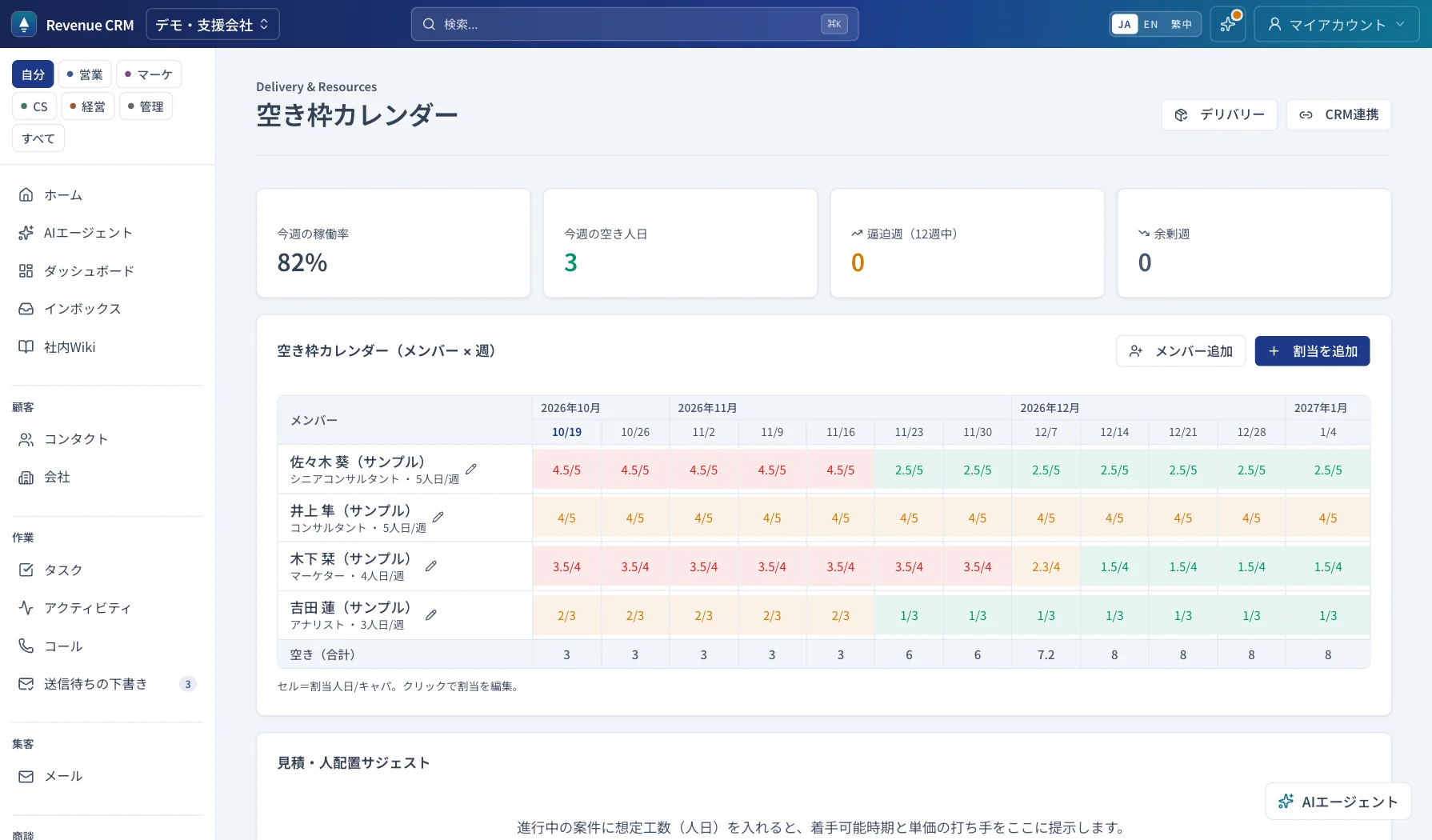
Capacity in the manager’s head, contract end dates in a spreadsheet, review meetings in someone’s memory. This edition puts capacity, free time, retainers, and renewals in one place, so you decide on new work with numbers and start renewals 90 days ahead.
The question is not “can we win it.”
It is “will it continue.”
On monthly retainers, revenue builds from the clients who stay, more than from the next win. So this edition centers on what happens after the win. Put a contract end date on the engagement, and 90 days before it you get a renewal outreach task and a renewal engagement, then a renewal prep task at 60 days.
Clients stay when the work does not get thin. With capacity held per person and per week, you check who frees up when before you take on something new. Taking on too much and turning work down both become a call made on free person-days, not a feeling.
Retainers can also live on the subscriptions screen, where MRR, ARR, and churn are calculated from the contracts.
The problem
New work gets accepted without checking who is already full. Once it starts, the review prep and the reports stop keeping up.
Someone frees up next month, yet the answer today is “we are full.” When free time is not visible in numbers, the call always errs on the safe side.
Contract end dates live in someone’s memory. By the time anyone notices, it is too late for the renewal conversation and for the upsell.
Retention engine
When you create this edition, the retention automations are already on. They catch stalled engagements, create a review task for customers you have not contacted in a while, and line up renewal tasks and the renewal engagement 90 days before the contract ends, once a day.
Automations create tasks, notifications, and drafts. Customer emails go out only from automations you have turned on yourself, with the recipients and wording you chose. AI drafts are checked and edited by a person before use.
AI
You do not have to build a report to find something out. Ask it the way you would say it, and it searches capacity, contracts, customers, and attached documents.
Free capacity this week, contracts renewing this month, customers who need attention. All checked on the spot.
Ask and it will also add contacts or tasks for you. The AI never emails a customer.
Permissions
For contacts, companies, and engagements, choose what each role can see: everything, the team, or only their own. Freelancers can be limited to the customers and engagements they own, and export rights are set separately. An example setup:
Contacts, companies, and engagements keep a change history, so you can trace who changed what, and when.
30 days free
An email address opens a demo workspace with sample data. No password to set. This edition puts capacity, retainers, and renewals on its main screens. Every plan comes with a 30-day free trial, no card required.