
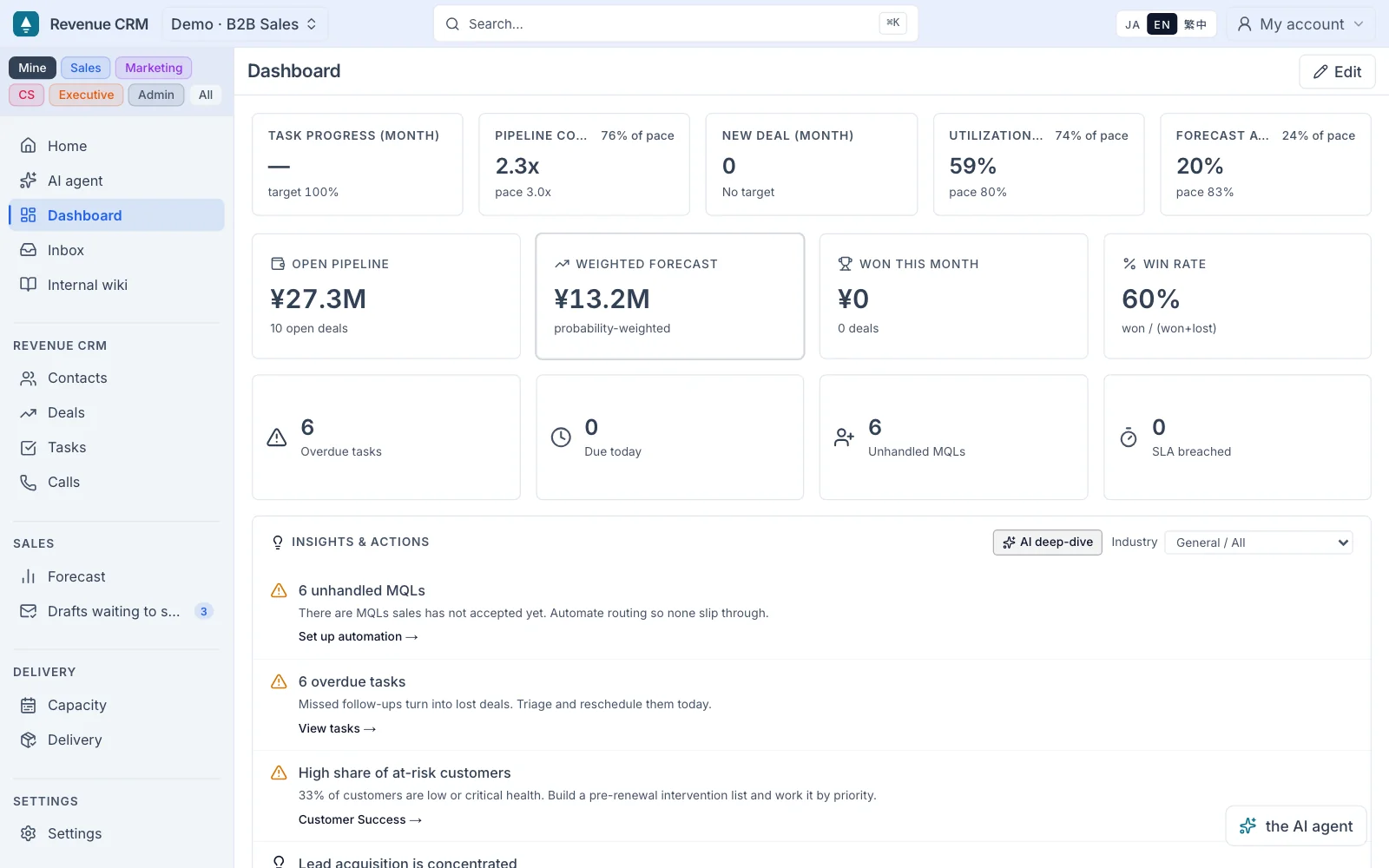
Consilegy LLC (Minato, Tokyo; CEO: Seiko Yamaguchi) launched the general release of Revenue CRM on September 28, 2026. Revenue CRM is a CRM for small and mid-sized companies that connects marketing (MA), sales (SFA), and customer management (CRM) on one customer record.
AI-drafted records, 175 automations, and setups tailored to each type of business come built in, reducing the data entry, configuration, and upkeep a CRM usually demands after rollout. Four editions are available: B2B sales, agencies and contract work, SaaS resellers, and schools (B2C).
The User plan is ¥3,000 per user per month (excluding tax). There is also a Prepaid plan at ¥3,000 per month (excluding tax) with unlimited users, paid by usage such as AI processing, and a Student plan for schools. Every plan comes with a 30-day free trial.
Background: customer relationships break at the boundaries between teams and tools
A customer relationship is one continuous flow. Marketing creates the first touchpoint, sales picks it up, a deal turns into a customer, and the relationship continues from there. In practice, that flow breaks wherever it crosses a team, a person, or a tool.
Marketing signals are not fully handed over to sales. Deal history is scattered across business cards, notes, calls, and chat. After a deal closes, customer support history lives somewhere else. When the person in charge changes, the history often does not follow.
Companies use MA for marketing, SFA for sales, and CRM for customer management to hold these touchpoints together. But the tools create a new problem. The front line gets the work of entering data, managers get the work of configuring the system, and the organization gets the work of keeping it running.
In our consulting work, we have seen many organizations that cannot assign a dedicated CRM owner, where this upkeep becomes the reason teams stop using the tool. Once data entry stops, records stop too, and customer information scatters back into business cards, notes, and individual inboxes.
What eight years of CRM implementation taught us: reduce the work, don't train harder
Our founder has spent about eight years implementing and running CRMs, mainly HubSpot and Salesforce, for more than 40 companies. The question that kept coming back was how to get front-line teams to keep using the CRM.
Our answer was not to leave adoption to the team's effort, but to cut the work the CRM asks of people. Instead of fitting people to the CRM, fit the CRM to people's work. Revenue CRM is built on that idea.
Design: connect the customer relationship, and cut the work done for the CRM's sake
Revenue CRM treats the work usually split across MA, SFA, and CRM as one process: building, handing over, and accumulating the relationship with each customer.
Marketing features such as forms, lists, email, and lead scoring; sales features such as deals, pipeline, and forecasting; and customer features such as health scores, tickets, and renewals all run on the same customer record.
To keep that flow going on the front line, AI reduces data entry, configuration arrives already done, and automation keeps operations moving.
Three capabilities behind Revenue CRM
1. AI-drafted records
Photograph a business card and it becomes a contact, with a suggested follow-up message. Talk through a meeting and AI extracts the transcript, key points, and next actions, then creates tasks and contacts from the notes. The team reviews instead of typing. This reduces the effort of recording the information that business cards, notes, and audio generate every day.
In HubSpot Japan's "Survey on Sales in Japan 2026," published in February 2026, respondents who use generative AI to enter activity records into CRM/SFA reported saving an average of 4.0 hours per week.* This figure comes from the survey responses and does not describe the effect of using Revenue CRM.
2. 175 automations, with a diagnostic
Revenue CRM includes 175 automations for routine marketing, sales, and customer success work, such as lead assignment, follow-up reminders, stage-change notifications, approval routing, and renewal notices.
You don't need all of them. A diagnostic reads your current setup and suggests up to eight automations worth turning on.
3. Setup that fits the business
Fields, customer management, pipelines, and automations are designed in advance for each type of business and delivered as an edition. You start with the setup already in place. We do not hand over an empty CRM and ask you to configure it from scratch.
Four editions, by type of business
Instead of designing a CRM from zero after signing up, you pick one of four editions built around how the business works, and start with it already set up.
- B2B: corporate sales and deal management
- Agencies and contract work: from winning the project through delivery and utilization
- SaaS resellers: for companies reselling their suppliers' products
- Schools (B2C): from student inquiries and trial lessons to support history during enrollment
B2B sales tracks deals, while a school follows each enrolled student over time. Because the unit of management differs, B2B and B2C are designed separately from the start.
Pricing
Editions decide which business the CRM is set up for. Plans decide how you use it and how you pay. All three plans include the same features. What differs is the billing unit (users, students, or usage). Every plan includes an AI usage allowance in the monthly fee, and you can buy more when you run out.
| Plan | Pricing | Best for |
|---|---|---|
| User plan | ¥3,000 per user per month (excl. tax). The per-user price stays the same as you add users. | B2B teams using it daily |
| Student plan | Monthly fee based on enrolled students, from ¥9,800 per month (excl. tax) for up to 50. The number of teachers and staff does not affect the price. | Schools using it daily |
| Prepaid plan | ¥3,000 per month (excl. tax), unlimited users. Includes an allowance for AI processing and more; top-ups are valid for 90 days. | Occasional or uneven use |
- No setup fee. Onboarding support such as process design, data migration, and adoption support is a paid option, quoted separately.
- 30-day free trial.
- Details of the AI allowance and top-up pricing are on the pricing page.
Try it first
Enter your email address to open a demo environment, with no password to set up. See records, automations, and the preset configuration on the real screens.
- Demo: https://crm.consilegy.com/demos
- Pricing: https://consilegy.com/en/crm/pricing/
- Product site: https://consilegy.com/en/crm/
Comment from our CEO
FAQ
Is it already in use?
Since June 2026 we have run a closed beta with companies in several industries, including schools and B2B, and built their feedback into the general release. Company names are not disclosed. Case studies will be published as each company approves them.
Doesn't offering your own CRM conflict with implementing HubSpot and Salesforce?
They serve different organizations. The line is not company size but whether the organization can assign a dedicated person to run the CRM. For organizations that can't, we offer Revenue CRM. For those that can, we continue to implement and support HubSpot and Salesforce. Revenue CRM can also read data from HubSpot and send lists to HubSpot.
How much email can it send?
It supports one-to-one sales email, sends to static and dynamic lists (with scheduling, open rates, and click rates), and daily sequences. You can send from your own domain, with SPF/DKIM DNS verification in settings. It is designed for up to a few thousand emails a month; bulk sends in the tens of thousands are out of scope. For those, send bulk email from your MA tool and use it alongside Revenue CRM.
What does "175" count?
The number of automation workflows you can switch on or off (as of September 2026). It is the same across all four editions.
How is data sent to AI handled?
The terms of service prohibit external generative AI providers from using your data to train their models. When you approve or correct an AI judgment, the result only affects your own workspace settings and is never used for other organizations. Rights to AI-generated text belong to the user.
What about security?
Data access is isolated per organization (row-level access control), and multi-factor authentication is supported.
Does it connect to Zoom, Teams, or other meeting tools?
Not at this time. Upload a recording to get a transcript and key points.
What happens when the free trial ends?
Sign up for a paid plan and you pick up where you left off. If you don't, the workspace is paused after 30 days and data is kept for 90 days.
*Source: HubSpot Japan K.K., "Survey on Sales in Japan 2026" (published February 27, 2026; surveyed October 30–31, 2025; 1,545 sellers at companies with 51–5,000 employees and 515 buyers). "4.0 hours" is the average weekly time saved reported by respondents who use generative AI to enter activity records into CRM/SFA.
https://www.hubspot.jp/company-news/stateofsales-20260227 (Japanese)
About Consilegy
Consilegy LLC designs revenue architecture and RevOps, bringing sales, marketing, and customer management (CRM) into one revenue system. We work alongside clients from strategy through MA, CRM, and SFA implementation to adoption, and we build and provide our own CRM, Revenue CRM.
| Address | R-Cube Aoyama 3F, 1-3-1 Kita-Aoyama, Minato-ku, Tokyo 107-0061, Japan |
|---|---|
| CEO | Seiko Yamaguchi |
| Founded | May 2025 |
| Business | Revenue architecture design and implementation for B2B companies (HubSpot and Salesforce), and development of Revenue CRM |
| Website | https://consilegy.com/en/ |
Contact
Please reach us through the contact form.
This release was originally distributed in Japanese via PR TIMES: read the original
Seiko Yamaguchi, CEO, Consilegy LLC
"After about eight years of CRM implementation work, one thing kept bothering me. Companies adopt a CRM to spend more time with customers, yet before long the CRM itself creates more work.
Instead of asking people to try harder, the CRM should adapt to them. I want the time teams spend on data entry, configuration, and upkeep to go back to their customers. Revenue CRM is that idea, built."