Your CEO only reads the numbers, so your sales manager screenshots them every Monday

Monday, 8:45. Your sales manager takes a screenshot of the CRM home page and drops it into a chat with the CEO. Then she copies this month’s closed deals into a spreadsheet for finance.
Neither the CEO nor finance has a login. Someone decided at rollout that nobody should pay for a seat just to look at things. I understand the instinct. But that saving gets paid back in a different currency.
What you lose is the live number, not the seat fee
A screenshot is out of date the moment it lands. That’s the real cost: leadership runs the business on numbers from last week.
Do the math anyway. The User plan is ¥3,000 per account per month before tax, so five people who only read cost ¥15,000 a month, or ¥180,000 a year. Against that, say the manager spends 30 minutes a week on this. That’s about two hours a month, and every follow-up question means another screenshot.
The quieter risk is the borrowed login. “It’s only to look” is how shared passwords start, and a shared login can still change records and won’t tell you who did.
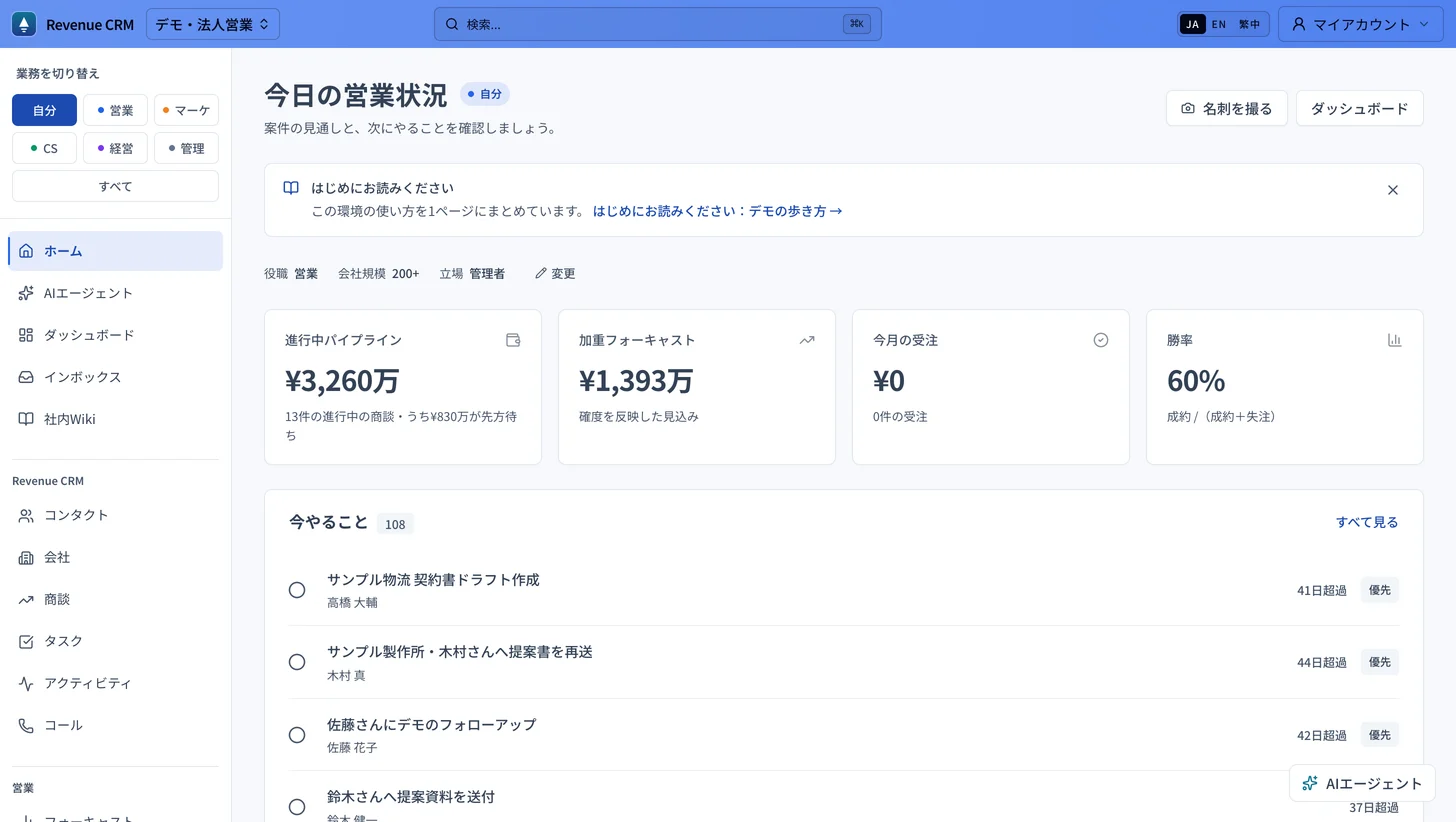 The home page, shown in Japanese on a paid seat. A view-only user gets these same numbers directly, with a banner across the top.
In Revenue CRM, people who only read get a free View-only seat
Invite them on a View-only (free) seat. There’s no headcount limit, and they don’t count toward billing or your monthly AI Fuel.
An owner or admin sets this up:
- Open Settings, then Members under Workspace
- Under Invite member, enter the email address and set Seat to View-only (free). It starts on User (paid), so this is the one step to watch
- Click Invite. The link in the email lasts seven days
For someone already on a paid seat, switch the seat in the member list. The invoice changes from the next bill, with no proration.
They’ll see a banner: “This is a view-only account. You can look, but not create, edit, send, export, or use AI.” Write buttons are hidden, and anything that slips through is refused anyway. The limit is enforced at the API and in the database, not just on screen.
Here’s what to check before you count on it:
- What they see follows the Member role. View-only seats are locked to the Member role, so they inherit its view scope under Permissions. On All, the default, they see the whole company. If you’ve narrowed deals to Owned for Members, a CEO who owns no deals sees 0 on the home page and nothing in the list. The worst part is that 0 reads like a real number. Contacts and companies work the same way, row by row
- If you’ve narrowed to Team, put the view-only person on that team and they’ll see its records. But there’s no way to give one view-only person everything while Members stay restricted. Make that person a paid Admin, or a Manager whose view scope is still All. It’s the one seat I wouldn’t try to save
- No CSV exports. If finance needs to work with the data, give them a paid seat or have someone who can export send it
- No notes either, and no completing tasks. Before you move a rep to view-only, clear the tasks they own
- Moving a paid user to View-only sets their role to Member, and moving them back doesn’t restore it. A former Manager needs the role picked again
- AI Fuel is 30 per paid seat a month, with a minimum of 100, so above three seats, dropping paid seats also lowers your Fuel
- The owner stays on a paid seat, and nobody can change their own. On the Prepaid plan the fee doesn’t depend on headcount, so seat type won’t change what you pay
For agencies and implementation partners there’s also a Support (free) seat, up to three per workspace. It can’t send, handle billing or remove members, and it can’t go to someone on your own email domain.
Your first step
This week, pick one person who gets the screenshots and invite them as View-only. First check that Member’s view scope for deals is All under Permissions.
Next Monday, skip the image and just write, “It’s on the home page.” If they can open the numbers themselves, move to the next person. There’s no need to switch everyone at once.
Start the demo with just an email address, choose B2B sales, and open Members in Settings to see the three seats. The demo is shared, so look but don’t send an invite.
The demo opens with just an email address.