To know how full next month is, the owner has to ask every teacher
Tuesday lunchtime, a trial inquiry comes in: “Do you have any weekday evenings free next week?” The owner messages all three teachers to ask what’s booked. The last reply arrives late in the afternoon, and the prospect gets their options the next morning.
What you lose is a fast reply, and the chance to spot an uneven load
When bookings are split across each teacher’s planner and chat thread, nobody holds the full picture of the school.
Say a school has three teachers, and twice a week the owner spends 20 minutes collecting availability. That’s close to three hours a month spent just checking. And a trial inquiry that waits half a day can easily sign up somewhere else.
The second loss is balance. One teacher is booked solid while another’s evenings stay empty, and you only see it by laying everyone’s schedule side by side. Teachers who feel stretched have nothing to point to either.
In the school edition of Revenue CRM, the Calendar shows every booking in one month view, color-coded by teacher
Open More → 📅 Calendar from the bottom navigation (or Calendar in the desktop sidebar). This month’s grid fills with entries like “19:00 Hanako Yamada”, with a colored dot for each teacher.
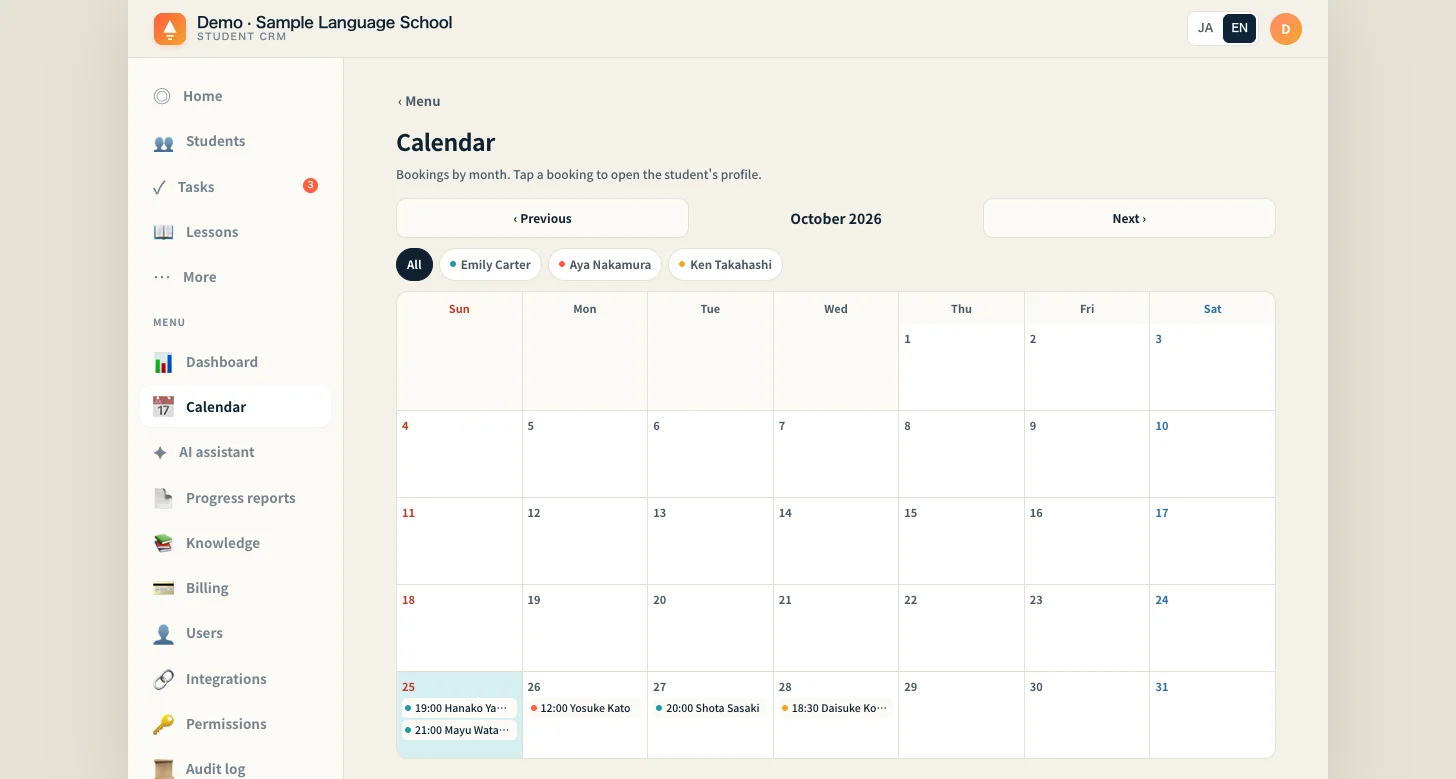 On desktop it’s Calendar in the sidebar. Each booking shows the time and student, and the dot color tells you the teacher.
- Use ‹ Previous and Next › to move across four months: last month through two months ahead
- Tap a teacher’s chip at the top to show only their bookings. All brings everyone back
- Tap a booking to open that student’s profile. On desktop, hovering shows the lesson type and teacher too
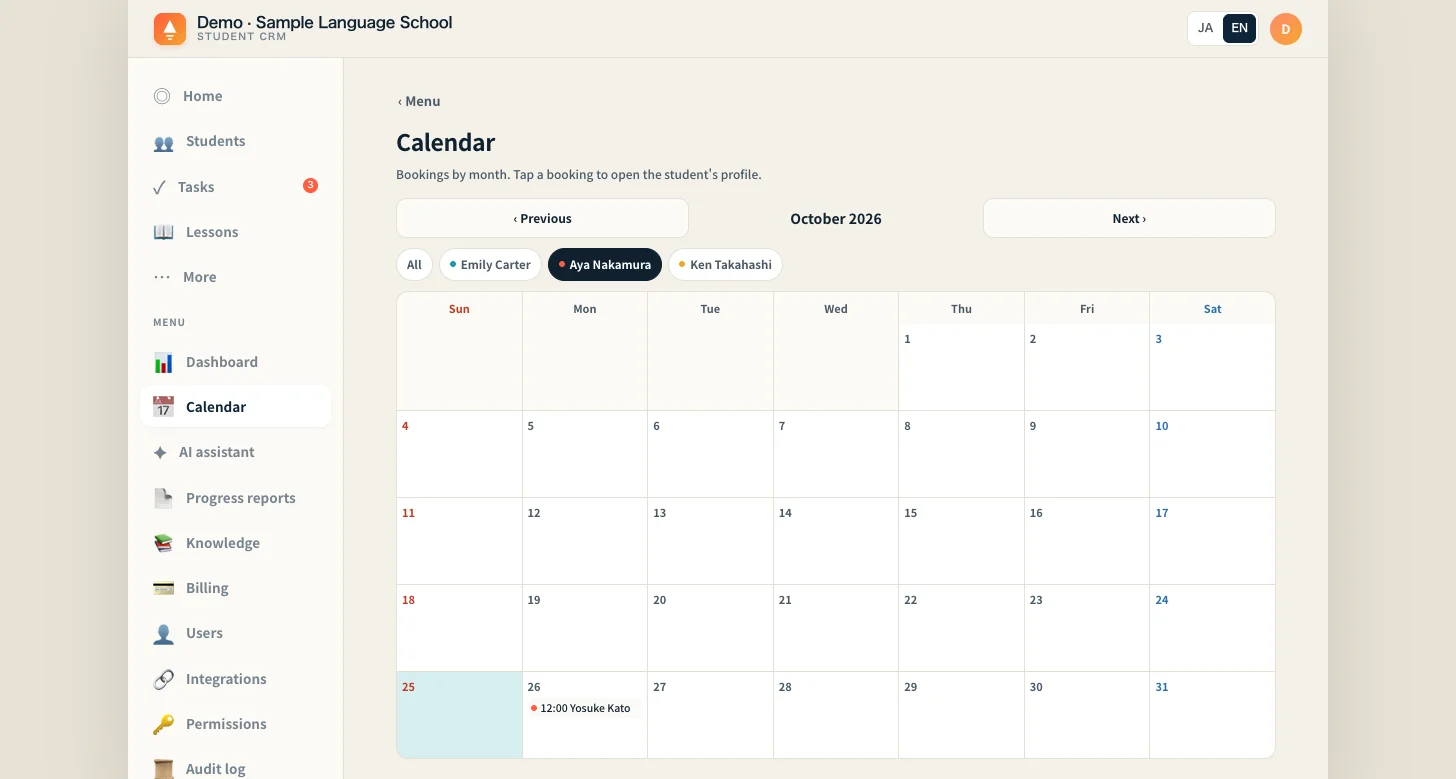 Tap one chip and only that teacher’s bookings remain. This is how you spot an uneven load.
What appears here is every booking made with 📅 Book next lesson on a student profile, every booking a student makes with the 予約する (Book) button in your school’s LINE menu, and every booking added with 振替 (make-up) on the Lessons screen. Anyone on the team, whatever their role, sees the whole school’s bookings.
Five things to know:
- It shows bookings, nothing more. There are no per-teacher totals and no list of open slots. An empty cell may simply be outside that teacher’s hours, so read the gaps against 🕘 Teachers’ booking hours further down the same screen. 📅 Book next lesson doesn’t check for clashes, so double bookings can happen
- 振替 (make-up) cancels the original booking if it falls within the next seven days (it stays in the grid, faded with a strikethrough) and adds a new booking at the same time, one week from the day you press it. If the original booking is further out than that, it is not cancelled, so the same student can appear twice
- You can’t move or cancel a booking from this screen. If Google Calendar is connected, moving the event there moves the booking, and deleting it fades the booking with a strikethrough, after the next sync (the manual sync on the Lessons screen or the daily automatic run)
- There are four colors, so once five or more teachers have bookings, some share a color. Chips use the teacher name exactly as written on the booking, so two spellings of the same name become two chips
- Further down the same screen, 📲 View in your phone calendar shows subscription links only once feed URLs are configured on the service side; until then, it shows a setup notice instead
Your first step
Ask your teachers for one thing this week: enter the next booking with 📅 Book next lesson on the student profile, not in their own planner.
On Friday afternoon, open Calendar and look at next week and next month. Tap each teacher’s chip in turn and check whether the load is even, and which evenings are still free. The sign it’s working: the next trial inquiry gets its options from you first, with just a quick confirmation from the teacher.
Start the demo with just an email address, choose Schools, and open More → Calendar to see the next few days of bookings laid out in each teacher’s color. The demo is shared, so bookings added by other visitors may also appear.
The demo opens with just an email address.